
- Hindi News
- Business
- IRCTC Website And App Down On Chhath Festival; Thousands Face Ticket Booking Issues
New Delhi2 minutes ago
- copy link
Today i.e. on 25th October, the first day of Chhath festival, IRCTC website and app were down. People are facing difficulty in booking train tickets from 10 am onwards. Earlier on Diwali also, IRCTC website and app were down.
According to outage tracking platform Down Detector, people started filing complaints about sites and apps being down from 9:00 am. Around 180 people had reported it at 10 am. Even on social media, people kept complaining about the website being down.
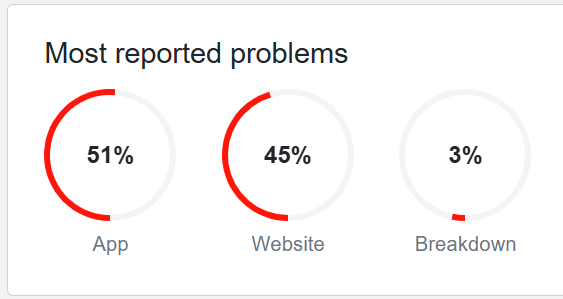
According to Down Detector, 45% people have complained on the website and 51% on the app. However, the complaints of website and app being down on Down Detector have reduced.
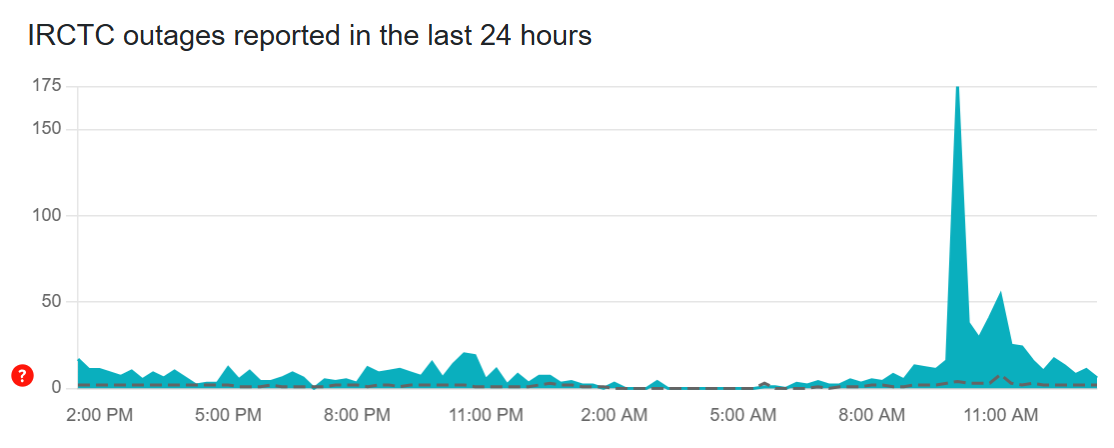
IRCTC downed before Tatkal booking time
The time to book tatkal tickets for AC class on IRCTC is 10 am. Whereas for sleeper class the time to book tatkal tickets is 11 am.
IRCT’s ticketing platform went down at the time of opening of Tatkal booking. People who had booked for Chhath through Tatkal quota had to face problems. About 12.5 lakh tickets are sold daily on IRCTC.
What to do if IRCTC website is down
In case the IRCTC website is down, users can call the customer care numbers 14646,08044647999 and 08035734999. You can also express your problem through email etickets@irctc.co.in. If it is urgent then you can book the ticket by going to the counter.
Online Railway Ticket Booking Process
Step 1: Create IRCTC account (if not already)
- Open IRCTC website (www.irctc.co.in) or app.
- Click on “Register” button on the homepage.
- Fill the details: Name, Mobile Number, Email, Password, Security Question.
- OTP will come on mobile and email – verify.
- Submit. The account will be activated.
Step 2: Login
- Click on “Login” on the website/app.
- Enter username (email or ID) and password.
- Solve the captcha and login.
Step 3: Search for trains
- After login go to “Plan My Travel” or “Book Ticket” section.
- Boarding Station, Destination Station, Journey Date and AC 1st, 2nd, 3rd, Sleeper
- Click on “Submit”. The list of available trains will appear.
Step 4: Select train and start booking
- Select the train of your choice from the list (check train number, departure time, availability).
- Click on “Book Now” button.
- Confirm: Whether the train details, class, quota (General/ Tatkal/ Ladies) are correct or not.
Step 5: Fill passenger details
- Click on Add New Passenger and fill the details.
- If the passenger is previously saved, select from “Saved Passenger”.
- After proceeding, make UPI, card or net banking payment.
Step 6: Ticket Confirmation and Download
- PNR number will be generated if the payment is successful.
- Download e-Ticket (in PDF) by clicking on “Print/Save”.
- Confirmation will also come on email/SMS. Show PNR in train.
IRCTC in trend
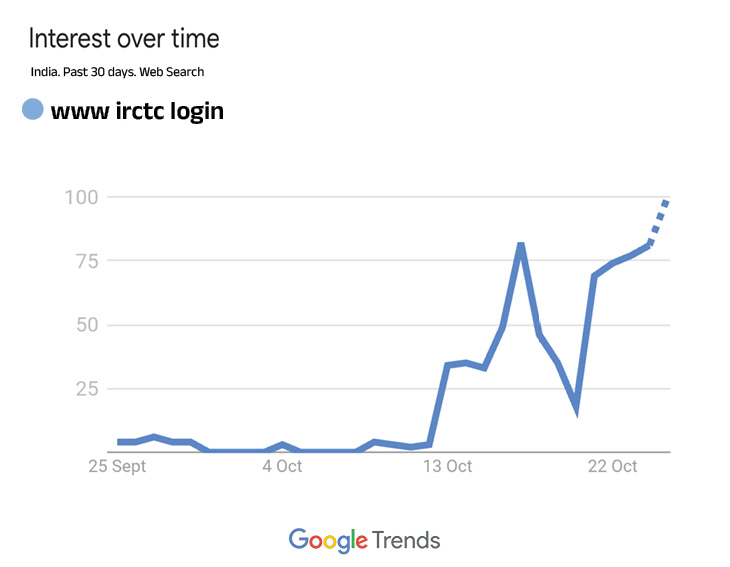
IRCTC website and app are continuously down during festival time. Earlier on Diwali also, IRCTC website and app were down. After being down today, Google’s RCTC remains on trend. See top trends
Source link
[ad_3]

