
- Hindi News
- Business
- Google Removes Fake Loan Apps From Play Store | Data Theft & Fraud Alert
29 minutes ago
- copy link
On the complaint of Home Ministry, Google has removed 3 more fake loan apps from Play Store. So far this month, 9 such fraudulent apps have been shut down. These apps not only steal your personal information, but also harass and demand excessive interest after giving the loan.
Through this Q&A guide, know the easy ways to avoid fake loan apps and stay safe…
Question 1. Which 3 new loan apps has the government taken action against and what are the allegations against them?
answer: The Cyber Security Team (I4C) of the Home Ministry sent a notice to Google on August 19 asking it to immediately remove three fake loan apps. The names of these 3 apps are: Horizon Cash Service, Money Score Monitor, and JellyCredit. It is alleged that these apps used to trap people by luring them to give loan in 5 minutes at low interest and later used to charge huge interest and penalty from them.
Question 2. What personal information were these apps stealing from your mobile?
answer: As soon as a user downloaded these apps on the phone, these apps would secretly steal the entire information of the phone. These include access to identity card, bank account information, contact list in the phone (numbers of relatives and friends), photo gallery and camera. Later, these thugs used this information to blackmail people.
Question 3. How quickly did Google take action on these apps and under what rules did they remove them?
answer: The government agency had ordered Google to remove these three apps from the Play Store within just 3 hours of receiving the notice. This action has been taken under the sections of the Information Technology Act. Google immediately accepted the government’s order and removed these three apps from the Play Store.
Question 4. Has action been taken against any other such apps this month?
answer: Yes, even before this on August 7, the government had asked Google to remove 6 fake loan apps. The names of those apps were: Loan Orbit, Hisab, Nexs Loan, One Fund, Credit Factor and Mobile Credit. That is, in August alone, a total of 9 apps have been closed which were making common people their victims.
Question 5. How do these fake apps trap people?
answer: These apps run advertisements on Google Play Store and social media. The advertisements read – “Get a loan of ₹ 50,000 in 5 minutes without any documents, without CIBIL score.” People who are in some need or compulsion, get deceived after seeing such advertisements and download the app.
Question 6. Is the government taking any action against fake websites other than loan apps?
answer: Yes, the government is now taking action against loan apps as well as fraudulent websites on the internet. In the same month, the government gave instructions to shut down about 57 fake websites and databases running on Google’s server Firebase. These websites were spreading viruses on people’s phones and stealing information about their bank accounts.
Question 7. How to identify real and fake app before taking money from any loan app?
answer: If you ever need to take an online loan, find out in these 3 easy ways:
Check RBI approval: Any genuine loan app is associated with some registered bank or NBFC. The name of that bank or company is definitely written in the details of the app.
Register on RBI website: Visit the RBI website and check whether the company is registered. Genuine companies have permanent offices, landline numbers and email IDs.
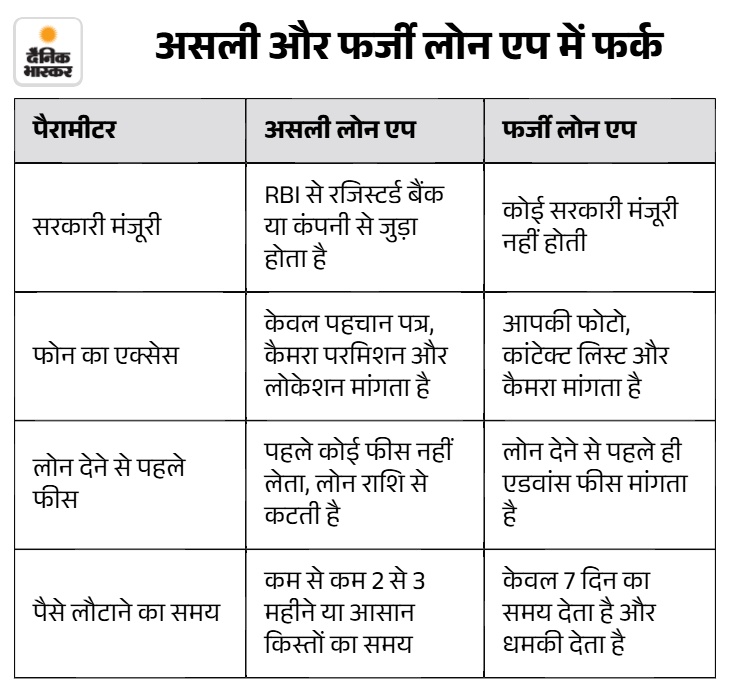
Question 8. What things should be kept in mind while downloading an app on the phone? Needed?
answer: Always keep these 4 things in mind for safety:
- Don’t give wrong permissions: If any loan app asks you for permission of your phone’s contact list or photo gallery, then delete the app immediately. There is no need for contacts to give loan.
- Don’t pay first: If the app asks you for money in the name of processing fee or file charge before getting the loan, then understand that it is a fraud. Real companies give money after deducting fees.
- Read people’s reviews: Read bad reviews (1-star) carefully before downloading the app on Play Store. If the loan app is genuine then its reviews can also be good and more.
- Do not download the app from the link: Do not install the APK file that comes from any unknown message, WhatsApp or link. Download apps only from the official Play Store.
Question 9. If someone accidentally falls into the trap of a fake app, what should he do?
answer: If any fake app is bothering you then take these steps immediately:
- Call the helpline: Immediately call the national cyber helpline number 1930.
- Register Complaint Online: Register your complaint by visiting cybercrime.gov.in.
- Complain to the police: Complain to the cyber cell of your nearest police station.
- Delete app from phone: Delete that app from the phone immediately.
What are I4C and government regulations?
- I4C (Cybercrime Centre): This is a special team of the Home Ministry, whose job is to prevent online fraud and cyber crimes in the country.
- Government Rules (IT Act 79): This rule means that if the government informs a company about any wrong or dangerous app, then the company will have to remove it immediately.
Important advice for you: Never allow any unknown app to view your mobile’s contact list or photo gallery out of greed for money.

Source link
[ad_3]

